Capture bugs, run tests, and connect your team’s quality work today. We’re building a tester that joins discussions, develops test coverage, and investigates failures—with project context and human oversight.
The core platform is available today. Conversational testing is in active development; not yet released. The full autonomous tester workflow is in research and development.
bugAgent brings bug reports, automated testing, AI-assisted analysis, and human expertise into one quality workflow. These capabilities are the foundation for the autonomous tester we’re developing. Availability varies by plan and feature.
Live
Enrich
Every report — bugs, feature requests, enhancements, technical debt — is automatically classified, scored, and enriched with environment data, reproduction steps, and root cause analysis.
AI classification across 19 types — bugs, features, enhancements, and more
Auto environment capture & severity scoring
Rich media — screenshots, videos, annotations
Jira sync with mapped fields & priorities
Context-aware AI Assistant with voice and document knowledge
bugAgent Tools (SDK) — capture the last 60s of user activity, voice commands, WCAG scanning, and Playwright automation
Rewind — replay the last 5 actions in real time to recall what just happened
Raw"it's broken"
Enriched
UI BugHighiOS 17
Live
Delegate
Request exploratory testing, Playwright automation, or mobile testing support. Human testers and automation engineers contribute findings to bugAgent, with the engagement scoped to your application and team.
Exploratory testing by human QA teams
Playwright automation test suites
Connected agents can request scoped QA work
Results flow back as enriched reports
AIorPM
Human QA
Live
Investigate
The faster developers get actionable diagnostics, the faster bugs are fixed. Every report is enriched with root cause analysis, environment data, and AI fix suggestions. Scheduled Playwright and mobile automation reports surface regressions before users find them.
Scheduled web & mobile automation reports
Daisy-chain web and mobile runs into orchestrated daily tasks
Connect your quality work. Give testing its context.
Connect reports, automation results, and project knowledge so people and connected agents can investigate with relevant context. The next step is carrying that context into a conversational testing teammate.
Context Engine
Bug ReportsTitle, description, severity, type, environment, media, comments, time spent
AutomationPlaywright & mobile scripts, scheduled runs, pass/fail results, coverage maps
Quality Score10 context-driven dimensions scored by AI on every report
AI AnalysisRoot cause, suggested fix, verification steps, risk assessment via Claude
Notes & HistoryTesting notes, project history, team knowledge, Jira sync state
Keep findings and supporting context together so your team can review the evidence, follow up on gaps, and decide what to test next.
Test Any Application. Ship Quality Software.
Build, manage, maintain, analyze, and scale AI-powered automated testing — no code required. bugAgent is a context-aware QA platform that captures, preserves, and uses context so nothing gets lost between finding a bug and fixing it. The perfect platform to manage 1 to hundreds of testers, contractors, and freelancers all in one place.
TestLauncher Live
In active development; not yet released. TestLauncher Live is our developing conversational testing experience, intended to connect testing conversations to your applications, evidence, and human approval requirements. It is not generally available. Book a discovery call →
QA Brain
The tool-agnostic memory layer for your entire QA stack. bugAgent connects to every tool you already use and continuously extracts QA-relevant knowledge from each vendor into a unified, vendor-neutral knowledge base that you own. AI agents reuse that state instead of rediscovering your product on every prompt, so they always know the true context of what you ship and you save tokens and time on every run.
Deployment & Data Residency
Current production uses a US-hosted database. Canadian data residency is a planned deployment option for new clients, scoped and agreed before onboarding; it is not active in production today. Discuss Canadian, US, or custom deployment requirements with us, including storage, processing, backups, and subprocessors. See residency details →
Context-Aware Intelligence
The AI learns your product. Every report, note, automation, and schedule feeds a growing knowledge base. Upload files, add links, prompts, and keywords so bugAgent understands your product and business deeply. The more context you add, the sharper the QA engine becomes when analyzing and classifying reports.
AI Classification
Auto-classifies reports across 19 types — bugs, feature requests, enhancements, technical debt, and more — with severity scoring and confidence levels. Zero manual triage.
Bug Reports
Rich bug reports with title, description, severity, type, environment, and media. Built-in timers track every second of testing effort — start, stop, resume, and adjust manually. Time is saved automatically for QA billing and effort tracking.
Rich Media Capture
Screenshots, screen recordings with voice narration, and annotated images. Built-in markup tool with 7 colors for circling, arrows, and freehand annotations. Voice commands let testers start and stop recordings hands-free. Encoding, storage, and delivery handled automatically.
Chrome Extension
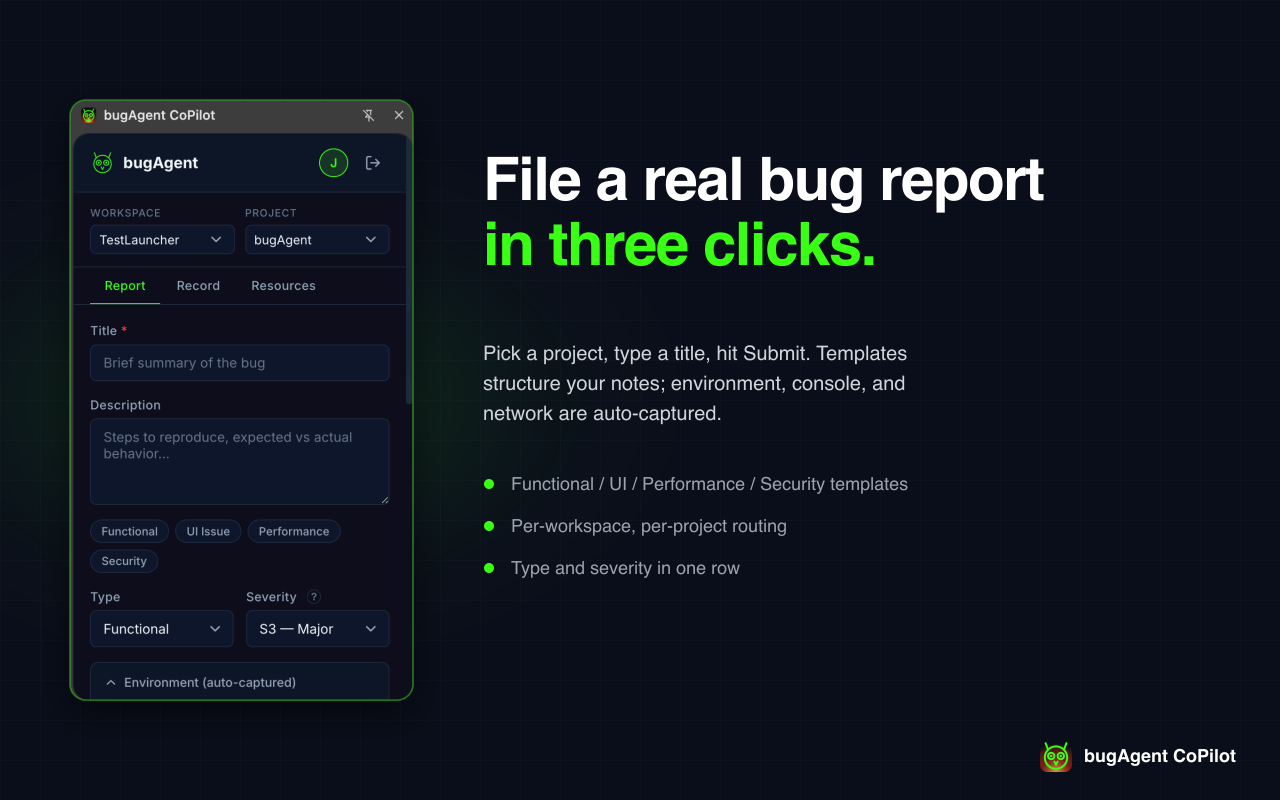
The bugAgent CoPilot side-panel extension turns any browser tab into a one-click bug report — environment, screenshots, console output, failed network requests, and a sanitized DOM snapshot auto-captured. Record actions for repro and generate a Playwright script on submit. Learn more →
Jira Sync
Zero-click, bi-directional sync to Jira. Fields, labels, priority, and comments auto-map and stay in sync both ways. Your reports appear as perfectly formatted Jira issues without lifting a finger.
MCP Agent Protocol
Built on the Model Context Protocol. Any AI agent — Claude, Cursor, VS Code — can file bug reports, manage test cases, trigger web and mobile automations, create notes, track time, run schedules, and more through natural language. The full platform is MCP-native.
Environment Detection
Auto-captures browser name and version, OS, device type, screen resolution, viewport dimensions, pixel ratio, language, timezone, connection type, cookie status, touch support, console errors, and network state. No more asking "what browser are you using?"
AI Assistant
Your always-on QA command center. Create and update bug reports, change status, add comments, search the backlog, and manage automations — all through conversation. Trigger web and mobile performance tests, list runs, and review results. Voice input, file attachments, and session replay analysis built in. Available in the dashboard and in-app popup.
bugAgent Tools (SDK)
Six tools in one SDK: Automate captures DOM mutations and user activity. Recorder records screen and voice. Annotate marks up screenshots with a 7-color drawing tool. WCAG Analyzer runs axe-core accessibility scans. Rewind replays the last 5 actions with a ghost cursor. Voice Commands lets testers control tools hands-free — say “start recording” or “stop annotate” without touching the mouse. Plus console logs, network waterfall, and performance metrics. AI auto-drafts bug reports from everything captured.
Rewind
Replay the last 5 user actions directly in the browser. Re-executes clicks, form inputs, toggles, scrolls, and navigations in real time with a ghost cursor and progress bar — so testers recall exactly what they did before the bug.
WCAG Accessibility Analysis
One-click accessibility evaluation powered by axe-core. Checks for WCAG 2.0/2.1 Level A and AA violations with impact severity, criterion references, element selectors, and remediation links — all included in the bug report.
Quality Score
Every report scored 1–10 across 10 dimensions. Track testing quality over time, spot gaps, and watch reports sharpen. Leadership gets a single health score for testing effectiveness.
Duplicate Detection
Identifies similar existing reports using text similarity on titles and descriptions. Flags duplicates before they clutter the backlog.
No-Code Web Automation
Record browser actions and generate Playwright scripts for review. Run on virtual viewports (30+ emulated devices) or real browsers via BrowserStack (Chrome, Firefox, Safari, Edge on Windows and macOS). AI optimization proposes changes to selectors, waits, assertions, and error handling. Review those changes against the intended behaviour before relying on the results. Includes video results, line-by-line pass/fail, and a coverage mind map.
Self-Healing Hub
Connect issue capture, AI-assisted diagnosis, scheduled testing, and review. External coding agents can use permitted API and MCP operations to retrieve findings and trigger tests within workflows your team configures. People review proposed application changes and verification evidence. The complete autonomous tester is a separate research direction, not a released end-to-end capability.
Notes
Capture observations in Markdown, Plain Text, Bug Template, Checklist, Outline, or Session Template formats. Session Templates provide context-driven structure for exploratory testers. Voice memos with Whisper transcription, built-in timer, file attachments up to 400 MB (images, video, audio, PDF, text), private or shared visibility. Convert to bug report with time auto-transferred. Auto-save with keyword search and filters.
Kanban Board
Drag-and-drop bug management across 9 status columns. Changes sync bi-directionally with Jira in real time. Toggle between list and kanban views with persistent preference.
Time Tracking
Log hours by project and category — testing, bug triage, automation, review, meetings. Track daily entries with descriptions, edit inline, and view daily, weekly, and monthly summaries. Filter by team member or project. Export for invoicing. Similar to how Harvest tracks time but built for QA teams. Enterprise feature.
Team Booster
The perfect platform to manage 1 to hundreds of testers, contractors, and freelancers — all in one place. Scale your QA team on demand with automation engineers, mobile engineers, expert testers, SDETs, and performance engineers. Recruiting and scaling up or down is built in. All time is tracked in the Time Tracking module. No charges until approval.
Test Cases
Create test cases with steps (action + expected result), drag-and-drop reordering, and Rapid Mode for fast authoring. Group into suites, assign test runs with notifications, and execute by marking pass/fail/blocked/skip. Failed cases instantly create bug reports with full test context and bi-directional links. Re-run failures with one click. Pass rate reports with CSV export.
Mobile Testing
Upload APK or IPA apps and run automated tests on real devices. Record secure login flows, import existing scripts, or generate YAML, Appium Python, and Appium JavaScript. Run on real Android and iOS devices with video recordings and full logs. Failed runs auto-create bug reports with failure snapshots and step breakdowns. Schedule runs with Slack and email notifications. Enterprise only; Refine with AI is an allowlisted Enterprise beta.
Performance & Load Testing
Lighthouse audits, k6 load testing, and BrowserStack mobile profiling. Performance Trends charts scores, Core Web Vitals, load metrics, and mobile stats over time (7d/30d/90d). AI Assistant answers trend questions like "Is my LCP improving?" Auto-bug reports, CSV export, and archive. Enterprise only.
Security Scanning & Pen Testing
Web DAST (Quick Scanner + Nuclei + OWASP ZAP), MobSF mobile binary analysis, Semgrep code SAST for 30+ languages, dependency vulnerability checks, and license compliance scanning. Plus active penetration testing: SQL injection, auth bypass/IDOR, privilege escalation, SSRF, endpoint fuzzing, and ZAP active scan — all rate-limited and safe. Three scan depths, authenticated scanning, auto-bug creation, and recurring scheduled scans. Enterprise only.
Code Review
AI-powered PR code review with Claude, Semgrep SAST, secret detection, dependency analysis, and dangerous code pattern scanning. Get a quality score and security score with findings from multiple engines. Auto-review PRs via webhooks, post inline comments on GitHub, and track trends with the review analytics dashboard. Unlimited on Enterprise.
Exploratory AI
Autonomous bug finder with up to 10 parallel agents — each with a different testing strategy (Happy Path, Edge Case, Security, Accessibility, Mobile, and more). Shared recon crawl fans out to parallel Plan/Execute/Analyze phases with Claude. Findings are deduplicated across agents and auto-filed as bug reports. Visual regression detection, scheduled runs, test data injection, and trend tracking. Enterprise supports 10 agents.
Geo-Snap
Capture screenshots from 50+ countries simultaneously. Verify localized content, geo-redirects, competitor pages, and compliance with local regulations. Available on all plans.
Full Traceability
Every bug traces to its origin: manual testing, automation failure, test case, AI assistant, or SDK. The entire QA lifecycle is connected: test case → test run → bug report → fix → re-test. No broken chains.
Analytics Dashboard
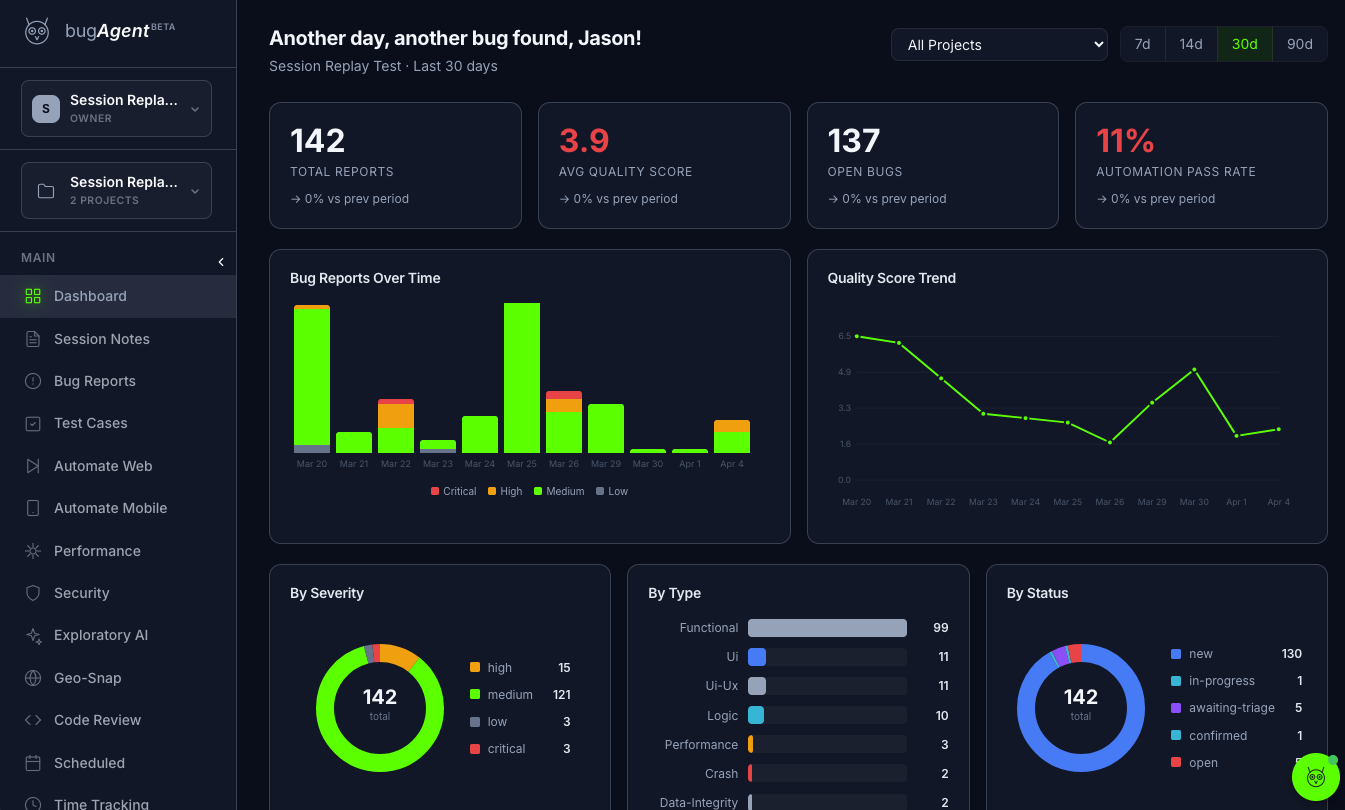
12+ interactive charts: bug trends by severity, quality score over time, severity/status/type breakdowns, top reporters leaderboard, automation health, mobile pass rates, time tracking by category, and a Quality Testing Health Score gauge (0–100). Filter by time range and project.
Team
Security & 2FA
Two-factor authentication via authenticator app or SMS (30+ countries). Enterprise includes SSO/SAML and audit logs.
Compliance Center
Automated SOC2, ISO 27001, and GDPR compliance tooling. Connect Cloudflare, GitHub, Sentry, Supabase, and Railway to auto-collect evidence. Config drift monitoring detects when security settings change. Quarterly access reviews audit team members, API keys, and MFA status. Cross-service SIEM correlates WAF blocks, error spikes, and auth failures into a unified security timeline. Backup verification and scheduled evidence collection. Enterprise only.
Team Chat
Real-time team chat built into your workspace — project-scoped channels, threads, direct messages, emoji reactions, @mentions, image & video sharing, presence, typing indicators, and full-text search. Keep QA conversation in context with the work instead of a separate tool. Team/Enterprise.
Self-Healing
Keep tests resilient as your product evolves.
bugAgent supports locator repair for Node Playwright runs. Mobile Refine with AI is an allowlisted Enterprise beta. Review the repair and execution evidence to understand what was tested.
Web — heals mid-run
When a supported Playwright locator times out, the runner can use the live DOM to propose a replacement and retry the step. The run records the attempted repair for review.
Locator repair for supported Node Playwright actions
Heals on our runner, not in your test code — no SDK to embed
Every heal is logged, so you see exactly what changed
Assertions remain in place; review the repair and test results
run.log
Timeout: locator"#submit-btn"not found[bugAgent] self-healed locator:"#submit-btn"→"button[data-testid='checkout']"Step passed. Test green.
Mobile — allowlisted beta
Refine with AI is an allowlisted Enterprise beta for improving recorded mobile tests. It evaluates locator choices and checks candidate scripts with repeated device runs. Availability is separate from standard mobile automation.
Record once — the agent hardens the locators for you
Validate the candidate with repeated real-device runs
Grades against your goal, not just "did it run"
The script is yours — export it, run it anywhere
Illustrative validation result
DeviceGoogle Pixel 8 · Android 14
Locatorsacc-id → res-id → label
Green runs2 / 2 passed
ResultRuns passed
Export scripts for use in a compatible environment. Repeated passing runs provide evidence for those runs; broader repair verification is part of our autonomous testing research.
One-click bug reports from any page — environment, screenshots, console output, failed network requests, and a sanitized DOM snapshot auto-captured and synced to your bugAgent workspace. Record the repro on the way out and generate a production-ready Playwright script.
Side-panel report form — title, severity, type, project, attachments, all without leaving the page you're testing.
Auto-captured environment — URL, browser + version, OS, viewport, device. Every field the dev needs without asking.
Diagnostic capture — console output, failed network requests, and a sanitized DOM snapshot attach automatically when toggled on.
Action recording → Playwright — capture a repro path and generate a production-ready Playwright script in seconds.
Page Links resource panel — bookmark URLs and Figma frames for the page so QA can jump back to context without searching Slack.
Our research direction connects testing, investigation, proposed fixes, and independent retesting. This illustrative sequence shows the intended workflow; the complete autonomous loop is not yet released.
bugAgent — Workflow illustrationCONCEPT
Real humans. Real testing. Requested by agents or you.
Need human eyes on your app? Request exploratory testing or Playwright automation from external QA teams — through the dashboard or let an autonomous agent decide when it's needed.
Exploratory Testing
Human QA testers explore your application like real users — finding edge cases, UX issues, and bugs that automated tools miss.
Human testers explore your app end-to-end
Finds edge cases AI agents miss
All bugs filed as enriched reports in bugAgent
Requestable via dashboard, API, or MCP
Exploratory Test Request
Requested byCI Agent
ScopeCheckout flow + payment forms
DevicesiOS Safari, Android Chrome, Desktop
Status3 testers active
Bugs found7 enriched reports
Automation & Mobile Testing
Engineers write and maintain Playwright web suites and mobile automation scripts tailored to your application. Agents can trigger runs after every deploy.
Custom Playwright suites for your app
Run against staging or production
Failures become enriched bug reports
Agents trigger test runs post-deploy
Scripts auto-sync to GitHub repos
Playwright Suite Run
Triggered byPM via Dashboard
Suitecheckout-e2e.spec.ts (42 tests)
Environmentstaging.app.com
Results39 passed3 failed
Reports3 enriched reports filed
Agents in the loop. An autonomous agent in your CI pipeline can decide your deploy needs human QA — and request it without a human manager. Or your PM can request it from the dashboard. Either way, results flow back as enriched bug reports.
Your command center for bug intelligence
Track bug volume, classification breakdown, and agent activity in real-time.
app.bugagent.com/dashboard
Fits into your existing workflow
bugAgent connects to the tools your team already uses. Jira sync, GitHub automation scripts, and more.
Featured community skill · Public preview
Put Hermes Agent to work on governed QA
Hermes supplies the model, browser, and execution runtime. The open bugAgent skill gives it one approved, project-bound suite and returns every result to an immutable run for human review.
Maintained by bugAgent as a community integration. Not maintained, endorsed, or supported by Nous Research.
Install from the public repositoryhermes skills install TestLauncher/testlauncher/skills/bugagent-qa
bugAgent Capture Plugin Source preview
A focused workflow for drafting bugs, checking possible duplicates, and looking up reports. Creation requires your approval. Hosted verification and OpenAI directory publication are pending.
Report bugs and manage QA without leaving your editor. Available via MCP and API connections.
Available
Slack
Real-time bug notifications, automation alerts, and failure reports in your channels.
Available
Figma
Upload a Figma zip export of your design frames and Claude drafts test cases directly into a folder you choose — per-screen + flow-level with a self-critique pass.
Not yet available
GitHub Issues
Create GitHub issues directly from bug reports.
Not yet available
Linear
Sync bugs to Linear with team assignment.
Not yet available
Discord
Bug alerts and reporting in Discord servers.
bugAgent Skills
Connect your tools. Supercharge your QA.
Every skill makes bugAgent smarter — connecting your workflow tools directly into the context engine.
GitHub
Save Playwright automation scripts directly to your repos. Track commits, branches, and pull requests alongside bug reports.
Claude by Anthropic
AI-powered root cause analysis on every bug report. Claude reads the full context and suggests fixes, verification steps, and risk assessment.
Atlassian Jira
Bi-directional sync keeps bug reports, status, priority, comments, and attachments in perfect alignment between bugAgent and Jira.
Bug capture with a review step
The bugAgent capture skill checks possible duplicates and asks you to approve a report before creation. Source preview only: hosted verification and directory publication are pending. Images are not uploaded by the plugin.
Have a product that manages bugs, code, or development workflows? Partner with bugAgent to reach thousands of QA teams.
Submit Your Integration
Thanks! We'll be in touch within 48 hours.
Connected through TestLauncher
Quality expertise meets Canadian innovation
bugAgent is built by TestLauncher. TestLauncher holds these memberships and relationships,
and bugAgent benefits from the same expertise, networks, programs, and resources.
Chrome ExtensionbugAgent Copilot (Chrome)One-click bug capture from any pageScreenshot + screen recordingAuto-attaches console logs & network errorsCaptures browser, OS & viewport contextSends straight to your workspace
AI Assistant (off by default; administrator-enabled per workspace)Ask it things like:"How do I install the Chrome extension?""Summarize my open bugs""Create a test case for the checkout flow""How do I connect Jira or GitHub?""What does this stack trace mean?"
Base Context Engine
Jira Cloud integration & bi-directional sync
Base connections & integrations
API & MCP access
Test cases: 10 stored, 1 suite, 3 folders
128 KB structured content per test case
URL references on test cases
10 test runs per UTC month
Hermes/external agents: up to 3 runs per month
Community support
Storage: 25 GBStorage overageContract allowances are tailored to your deployment and usage.Bring-your-own storage is available for Enterprise.
The complete QA platform, managed services, and knowledge engine for organizations at scale.
Everything in Free, plus:
Unlimited users
Unlimited projects
bugAgent Tools (SDK)
Playwright Automation & real-browser execution
Unlimited test case storage & runs
AI case generation, tag suggestions & Figma import
Test-case file attachments
Time Tracking & Geo-SnapCapture from 52 countries, e.g.:US · UK · Canada · Germany · FranceJapan · Australia · India · Brazil · ChinaSingapore · S. Korea · Netherlands · UAE…and 40 more across 6 continents
Upgraded Context Engine
Custom integrations & workflows
Team dashboard & Real-time Activity Feed
Agentic, regression, swarm & on-demand QA teams
Dedicated lead test coordinator
Triage, weekly syncs & white-glove test execution
Agentic API testing
Unlimited iOS and Android mobile automation
Unlimited Exploratory AI (10 agents)10 AI testing agentsHappy Path Tester — core user flowsEdge Case Hunter — boundary values & special charsSecurity Prober — XSS, auth bypass, injection, CSRFAccessibility Auditor — keyboard, ARIA, contrast, WCAGError Path Explorer — 404s, validation, recoveryPerformance Watcher — load times & resource useMobile Simulator — mobile viewport & touchData Integrity Checker — CRUD & state consistencyNavigation Tester — deep links, back button, dead linksCustom — your own instructions
Real-time Team ChatReal-time Team ChatProject-scoped channels + direct messagesThreads, emoji reactions, @mentionsImage & video sharing, full-text searchPresence + typing indicators
Open Query Knowledge Graph-RAG
Source indexing across code, docs, chats & QA history
Global knowledge queries for AI agents
Priority support
Experimental tools (early access)
SSO / SAML
Custom MCP tools
SLA guarantee
Dedicated support
Custom deployment planning (region, VPC, or on-premise scope by agreement)
Research & Innovation Quality Partner Program
Contract storage allowance or bring-your-own storage
Free test limits: 10 stored test cases, 1 suite, 3 folders, 2 active workspace API keys, and 10 total test runs per UTC calendar month. Up to 3 of those runs may use Hermes or another external agent, with 1 active external run and at most 10 cases in each external plan.
Each Free test case has a 128 KB structured-content maximum and can use URL references. Retrying with the same external_run_id resumes the existing run and does not consume another run. Deleting data does not reset monthly run usage. Enterprise test case storage and runs are unlimited, subject to general platform protections.
External-agent browser, model, and network costs remain customer-side. Customers must restrict the target and network egress. Both plans include SSL encryption, MCP protocol access, and email notifications. The dashboard AI Assistant is off by default on every plan; a platform administrator can explicitly enable it per workspace.
Switch to bugAgent — We'll Handle Everything
Free Migration
We'll export all your bug reports and automation scripts from your existing platform and set them up in bugAgent — completely free.
Our team will walk you through creating automated Playwright scripts using bugAgent Tools and configure your integrations.
Need hands-on help? Our full-time professional QA team can review, enrich, and improve your bug reports — and develop automation scripts tailored to your product.
We'll even build new features or integrations to support your journey.
Build better software. Shape the next testing teammate.
Bring us your hardest testing problems. Explore the platform available today and discuss how conversational, autonomous testing could fit your team as the research progresses.
Necessary storage is always on. With your permission, Google Analytics uses cookies to
measure visits. No advertising cookies. Your choice applies to this site for 180 days.
Privacy policy
 bugAgent CoPilot for Chrome